Penalty box
The penalty box screen is designed for officials stationed at the penalty tent. It shows the athletes due to serve a time penalty in your box and times their serves.
Opening the box
Tap Penalty Box on the race mode screen. If the race runs more than one box — a bike box and a run box, or several bike boxes — pick yours and tap CONFIRM. The screen stays awake while the box is open, so it won't turn off mid-penalty.
Which penalties show up
The box lists approved penalties only, one tile per athlete:
- Bike box — bike penalties, drafting included, for that box number.
- Run box — the other penalties. Drafting penalties are only served in a bike box; on a race without a bike box, bike penalties come to the run box.
- Stop-and-go penalties never appear in a box — see Stop-and-go below.
An athlete who's already out of the race (for example DNF) drops off the list.
Serving a penalty
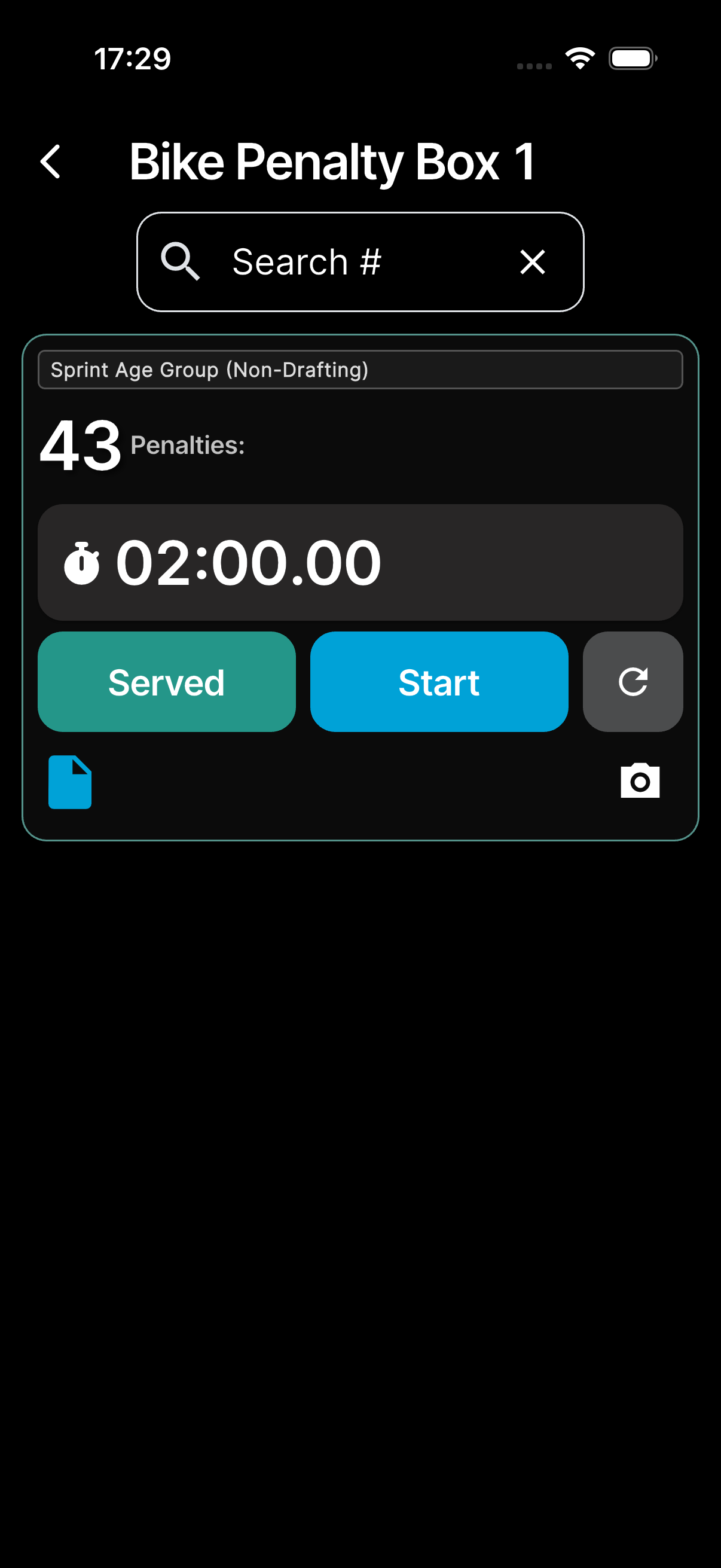
Each tile shows the race, the athlete number with the penalty type codes (e.g. "Penalties: V", with a count like x2 when the athlete has several), the athlete's name · country · gender, and a countdown. The buttons:
- Start — starts the countdown when the athlete enters the box. Stop pauses it; Start carries on.
- The reset button puts the timer back to the full time.
- Served — mark the penalty as served once the time is complete (or earlier if the athlete handled it on a previous lap). You're asked to confirm: Yes, Yes, with photo to take and attach a photo as you mark it served, or No.
The countdown is the serve time for the athlete's penalties. Each penalty type serves the race's standard time or its drafting / blue card time, unless the race gives that type its own time (see race configuration). Several penalties for one athlete add up.
Below the buttons, the file icon shows the penalty's colour. The open icon jumps to the penalty's review screen; when the athlete has several penalties, the arrow lists them so you can mark one at a time as served. The camera icon adds a photo to the penalty.
The toolbar shows a live count of penalties in the box (penalties for the same athlete are counted individually). A Search # field and a sort button (newest first or by athlete number — unaccepted penalties always stay on top) help you find an athlete without leaving the screen.
One serve on every device
A serve belongs to the penalty, not to one phone. Every box device counts down the same serve, and if the app closes or the phone locks, the timer is still running when you come back.
- A tile started on another device says Started by and the official's name (or Paused by when it's paused).
- A serve someone else started or paused stays theirs: you see it, but its tile shows Served and Take over instead of Start and reset. Take over asks Take over this serve? → Keep or Yes, take over, and the serve carries on as yours. Served works for anyone once the time is up; before that it asks you to take over first.
- Not synced under the countdown means the serve hasn't reached the server yet, for example while you're offline. Timer not saved: refused means the server turned it down; tap the serve again.
- Only the official who started a serve hears its alarm. When the time is up, the athlete's number shows large at the bottom of that screen.
- The penalty's timeline records Serve started at bike box and Served at bike box · 3:00, and its review screen shows the serve, for example Served: 10:42–10:45 · 3:00.
The box stopwatch
Often you start timing before you know who the athlete is. On a tablet, stopwatches sit in a column on the right. On a phone, the stopwatch button in the toolbar opens one above the tiles and starts it in the same tap. Until the athlete is known, a stopwatch counts down the standard time — switch it to the drafting time with Pen / Draft.
Enter the athlete number under Bib at any time. The stopwatch then looks the athlete up in this box:
- Already serving (on any device) — the stopwatch joins that serve and resets.
- An approved penalty — its serve starts from the moment you tapped Start, so the athlete's tile runs on every device with the time already served.
- A report still waiting for approval — the stopwatch keeps running, and Served records the serve on that report without approving it.
- No penalty, on a box with walk-in serves — a walk-in (see below).
- Anything else — it's a plain timer and nothing is saved.
Walk-in serves
Some races let an athlete serve before the referee's report arrives — a walk-in. The technical delegate switches this on per box (Walk-in serves: run box / Walk-in serves: bike box).
On those boxes, when you enter a number with no penalty to serve, the stopwatch records a walk-in:
- Pick the penalty type. Several types add up their times.
- Add a photo or a Note if useful.
- When the time is done, tap Served, then Record.
Until you record it, the walk-in is kept on your device, for you only. Resetting it asks Discard walk-in? An athlete can't serve a second walk-in for the same penalty type.
When the referee's report comes in, RaceRanger joins the two into one penalty by itself if they clearly match: same race, athlete and penalty type, the report approved, and only one walk-in. The report then becomes served, with the walk-in's times and photos. Anything less clear is race control's call on the penalty's review screen — Merge, Not the same, Find a match, No report expected or Unmerge (see Penalties). A box tile whose report may belong to a walk-in says Possible walk-in with the time and the official.
Stop-and-go
Stop-and-go penalties never wait in a box: they're approved straight away and served on the spot. Late Briefing and Early Start are always stop-and-go, even on races that otherwise have stop-and-go switched off.
Open the penalty's review screen to serve it: its timer has Served, Start / Stop and reset. Any official who can report penalties on the race can serve it. Like a box tile, the timer runs on every device, with Started by, Take over and the alarm only for the official serving it, and the timeline records Serve started at stop & go and Served at stop & go. The reporting official can also time the stop with the Timer button on the submit screen.
Accepting incoming penalties
Races can opt in to an acceptance step with the race option Penalty box must accept penalties (see race configuration). When it's on and a new penalty is approved for your box, it first appears as a compact unaccepted card pinned to the top of the list, showing the athlete number and the penalty type. Tapping Accept confirms the box has seen it and opens a small prompt:
- Accept — accept the penalty as-is.
- With photo — take a photo first (for example of the athlete arriving), then accept. The photo is attached to the penalty as evidence.
- Cancel — leave the penalty unaccepted.
Once accepted, the penalty merges into the athlete's regular card (athletes with several accepted penalties share one card with a combined countdown). Acceptance is visible everywhere: the penalties overview shows a PB ✓ chip (or PB — while still awaiting the box), the penalty detail view shows the accepted state, and the race log records who accepted it and when.
When the race option is off (the default), there is no acceptance step — penalties go straight to the athlete's card exactly as before.
Permissions
Only penalty box officials (typically the Chief Penalty Box and Assistant Penalty Box roles) see the Penalty Box tile, and only on races with a penalty box. A penalty box official whose role can't report or approve penalties can still run the box, walk-ins included. Whether you also get a notification for each new penalty depends on your role — see Notifications.