Users and permissions
RaceRanger uses a two-level role system: user roles (event-level) and TO assignments (race-level). User roles control what someone can do within an event. TO assignments add finer-grained control for Technical Officials within a specific race.
Most of the time, you just do this
Give each person a user role when you add them to the event:
- People officiating on the course → Technical Official.
- The person running the event → Technical Delegate.
- The people who run volunteers and other field teams → Local Organizing Committee, which can manage crews.
- Everyone else (medical, media, timing) → the matching role from the list.
That's usually it. TO assignments only matter if your organisation has them enabled, and per-person overrides are for rare exceptions — the rest of this page is reference for when you need it.
How roles are assigned
- The technical delegate or event admin assigns a user role when adding someone to an event.
- If TO assignments are enabled, the delegate also assigns one or more TO assignments per race.
- Officials see only the features their assignment permits.
User roles
When someone is assigned to an event, they receive a user role. The available roles depend on your organisation's sport and configuration, and organisation admins can change them (see Editing your organisation's roles).
What each role can do (full permission table)
Triathlon user roles
The roles RaceRanger provides, unless your organisation has changed them:
| Role | Can modify event | Submit penalties | Approve penalties | View penalty details | Submit incidents | Update incidents | Location tracking | Download reports |
|---|---|---|---|---|---|---|---|---|
| Organisation admin | ✓ | ✓ | ||||||
| Technical Delegate | ✓ | ✓ | ✓ | ✓ | ✓ | ✓ | ||
| Technical Official | ✓ | ✓ | ✓ | ✓ | ✓ | ✓ | ✓ | |
| Team Leader | ✓ | ✓ | ✓ | |||||
| Medical (CMO) | ✓ | ✓ | ||||||
| Media | ✓ | |||||||
| Local Organizing Committee | ✓ | |||||||
| Timing |
A few more permissions sit outside the table: Technical Official can also disqualify (Can disqualify (DSQ)), Technical Delegate has the check-in permissions, and Local Organizing Committee has Can manage crews.
Key permissions explained
These are the names the roles editor uses.
- Can modify event — edit event settings, races, and assignments.
- Can submit penalties — log new penalties during a race.
- Can approve penalties — change a penalty's status (approve, decline, cancel).
- Can edit penalties — edit penalty details after submission.
- Can view penalty details — see full penalty information including photos and location.
- Can disqualify (DSQ) — disqualify athletes. It's separate from approving penalties: the DSQ option in penalty submission and the DSQ voice commands follow it.
- Can submit incidents — log new incidents.
- Can update incidents — change incident status and add updates.
- Can report athlete incidents — report incidents tied to a specific athlete (DNF, DSQ, lapped…).
- Can update environment — record weather and environment measurements.
- Can start & stop races — start and stop races from race control.
- Can manage crews — enrol crew members, manage crews, review crew reports and moderate crew chats; see Crews.
- Can do race check-in, Can manage check-in and Check-in notifications — athlete check-in; see Give officials access.
- Can download reports — generate and download race reports.
- Can use AI — report penalties and incidents with AI: by voice, on the phone and the watch, and with Report in race control.
- Technical official — marks the person as a TO, so they can get TO assignments per race.
- Location tracking — share your GPS position on the course map.
- Race view — open the race dashboard.
- Ready check — included in pre-race ready checks.
- Penalty notifications, Incident notifications and Environment notifications — receive those push notifications.
TO assignments (race-level)
When TO assignments are enabled for an organisation, Technical Officials can be assigned granular roles within each race. These map to real-world positions on the course — Chief Bike, Penalty Box, Finish, and so on.
Two roles work differently from the rest. Each is held alone on a race: picking it removes the official's other roles on that race.
- Official (default) — your organisation's default TO role. Every official gets it on each race until you pick other roles there.
- Not in Race — for an official who doesn't work that race. Race control's Team tab and the ready check leave them out.
All TO assignments (full list)
Available TO assignments (triathlon)
The set RaceRanger provides, unless your organisation has changed it:
- Official (default)
- Head Referee
- Chief / Assistant Bike
- Chief / Assistant Swim
- Chief / Assistant Run
- Chief / Assistant Race Official
- Chief / Assistant Venue Control Centre
- Chief / Assistant Registration
- Chief / Assistant Transition
- Chief / Assistant Pre Transition
- Chief / Assistant Para Transition
- Chief / Assistant Wheel Station
- Chief / Assistant Vehicular
- Chief / Assistant Lap Auditor
- Chief / Assistant Aid Station
- Chief / Assistant Technology
- Chief / Assistant Penalty Box
- Chief / Assistant Finish
- Video Review / Assistant Video Review
- Chief / Assistant Protocol
- Chief / Assistant Classifier
- Chief / Assistant Relay Zone
- Chief / Assistant Bike Check
- Chief / Assistant Drone
- Chief / Assistant Cross Skiing
- Chief / Assistant Start Area
- Chief / Assistant Technological Fraud
- Technical Official
- Competition Jury
- Not in Race
TO assignment permissions
Each TO assignment controls:
- Whether the official can submit penalties and incidents
- Whether they can approve or edit penalties
- Whether they can disqualify athletes — separate from penalty approval; the DSQ option in penalty submission and the DSQ voice commands follow it
- Whether they can work the check-in stations and manage check-in
- Whether they receive penalty, incident, environment and check-in notifications
- Whether their location is tracked on the course map
- Whether they can view the race dashboard
- Whether they can start and stop races
- Whether they can update environment/weather data
- Whether they can use the AI-assisted features
- Whether they are a bike official (affects penalty submission flow)
- Whether they are a penalty box official (drafting or general)
Customising permissions for one person
Roles come with a standard set of permissions, but sometimes one person needs a slightly different setup in a single event or race — without changing the role for everyone else. RaceRanger lets you override individual permissions in two places. An override always applies only to that person in that context; the underlying role is never changed.
Overriding for a user in one event
- Open the event and go to the Users tab.
- Edit the person you want to adjust.
- Expand Customize permissions for this event.
- Toggle the individual permissions (submit penalties, approve penalties, modify event, and so on).
The changes apply only to this user in this event. A dot next to the expander marks that overrides are active; clear the toggles to return the user to their role's defaults.
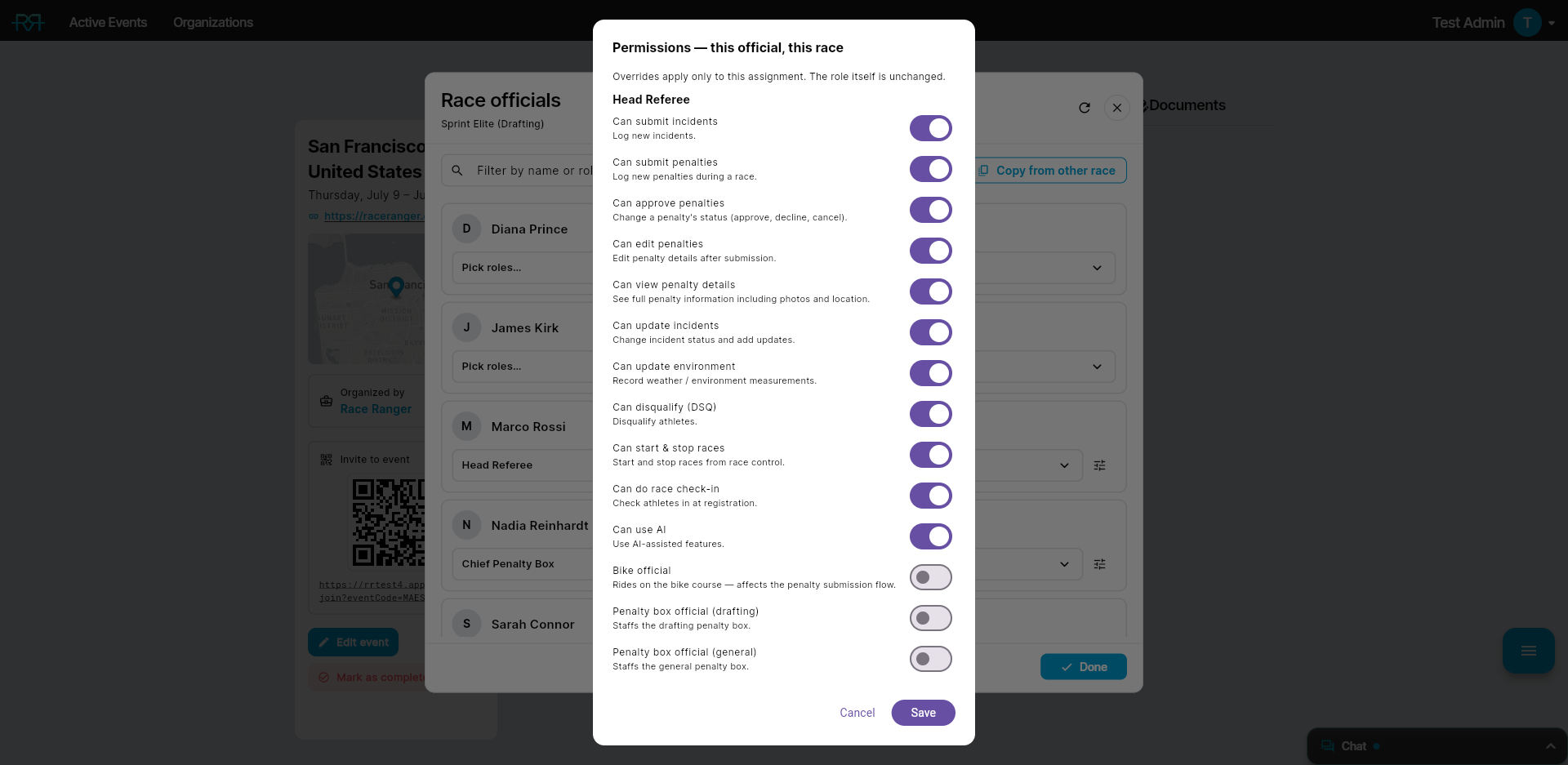
Overriding for an official on one race
When TO assignments are enabled, you can also fine-tune a single official's permissions on a single race:
- Open the race's Race officials list and select the official's TO role.
- Click the tune icon next to the role picker.
- Adjust the individual permissions in the sheet that opens.
If the official holds more than one role on that race, the sheet shows a single combined set of switches that applies to all of them.
The override applies only to this official on this race. The TO role definition — and the same role on other races or for other officials — is untouched.
Editing your organisation's roles
Organisation admins manage their organisation's roles on the web: choose Edit organization on your organisation's page and open the Roles tab. It has a list for User roles and one for TO assignments.
- New role adds a role; Duplicate as new role starts from an existing one.
- Edit a role to change its Display name, its Order in the pickers, its Chat membership (user roles only) and its Permissions.
- Retired (hidden from role pickers) retires a role. People who already hold it keep it; Show retired lists retired roles again.
Changes apply to people you give the role from then on. People who already hold it keep their current permissions. Once you've edited a role, RaceRanger's own updates no longer change it.
Chat access and localisation
Chat access and localisation
Chat access. Each role joins specific chat channels, set under Chat membership in the roles editor. For example, Technical Officials see the "Technical Team" channel, while Media sees only the "Media" channel.
Localisation. Role names and permissions are localised per organisation. For example, a Czech organisation sees role names in Czech, while a Swedish organisation sees them in Swedish. The underlying permissions are the same.