Joining an event
There are three ways into an event: scan its QR code, open an email invitation, or join as event crew.
QR code access
Events in RaceRanger are joined by scanning the event's QR code. Your organisation admin or technical delegate will share it — usually printed at the venue, sent by email, or shown on a screen during the officials' briefing.
To join:
- Open RaceRanger and sign in.
- On Active Events, open the menu at the top left and tap Scan. If you're not in any event yet, the screen shows Not added to event with its own Scan and Refresh buttons.
- Point your camera at the QR code.
- The app confirms Added to event.
An organisation admin or technical delegate then approves you. Until they do, your events list shows a Waiting for approval card with the event name. Once you're approved, the card is replaced by the event itself — the list updates on its own.
If your profile has no name yet, the app asks you to add it first, then finishes joining. Once you're in, you don't need to scan the code again — the event stays in your list until it's archived.
Joining from an email invitation
Organisation admins and technical delegates can also invite you by email, to an event or to their organisation.
- Open the link in the invitation email. On a phone it opens the app; on a computer it opens the web app.
- Sign in. If you're new to RaceRanger, create an account first — see Signing in.
- The app shows Invitation accepted. If your account's verified email address is the one the invitation was sent to, your access is active straight away. Otherwise an administrator approves you first.
- If your profile has no name yet, tap Set up my profile and add your first and last name, so the organiser can see who you are.
Each invitation link works once and stays valid for 14 days. If yours has expired or was already used, ask for a new one.
Joining as event crew
Volunteers, police, medical, security, and other field crews don't need an account or an email address:
- On the sign-in screen of the mobile app, tap Enter as event crew. Already signed in? Tap Join an event as crew under your events instead, to join with your RaceRanger account.
- Enter your name and age (and a phone number if you like), and tick the consent.
- Tap Show my code and show the code to your crew leader. They scan it from the event's Crews screen.
The code is valid for five minutes; tap Show a new code if it runs out. Crews have to be switched on for the event. The crew members guide covers what crew members see and do once they're in.
QR code sign-in on shared devices
The same QR code system signs you in on a shared tablet, without typing a password:
- On the tablet's sign-in screen, tap the QR button under Sign in with:. The tablet shows Scan to log in with a QR code.
- On your own phone, open race mode, open the menu at the top left, and tap Scan. Scan the tablet's code.
- Check the request and tap Approve sign-in.
- The tablet is signed in under your account and enters the event.
Only the in-app scanner can approve a sign-in — opening the code as a link, or a code someone forwarded to you, won't work. A code lasts five minutes and works once. If it has expired or was already used, show a new one on the tablet and scan again.
This avoids typing passwords on shared devices and gives a quick handoff between users.
What you see after joining
Your view of the event depends on the role assigned to you:
- Organisation admins see event settings, user management, and high-level data.
- Technical delegates see race configuration, official assignments, and preparation tools.
- Technical officials see the race-day interface — penalties, incidents, chat, and tracking.
- Crew members see their own crew screen: their crew, race times and status, announcements, a crew chat, and the reports they send in.
Until an administrator approves you, you can't open the event — your events list shows the Waiting for approval card instead.
The event workspace
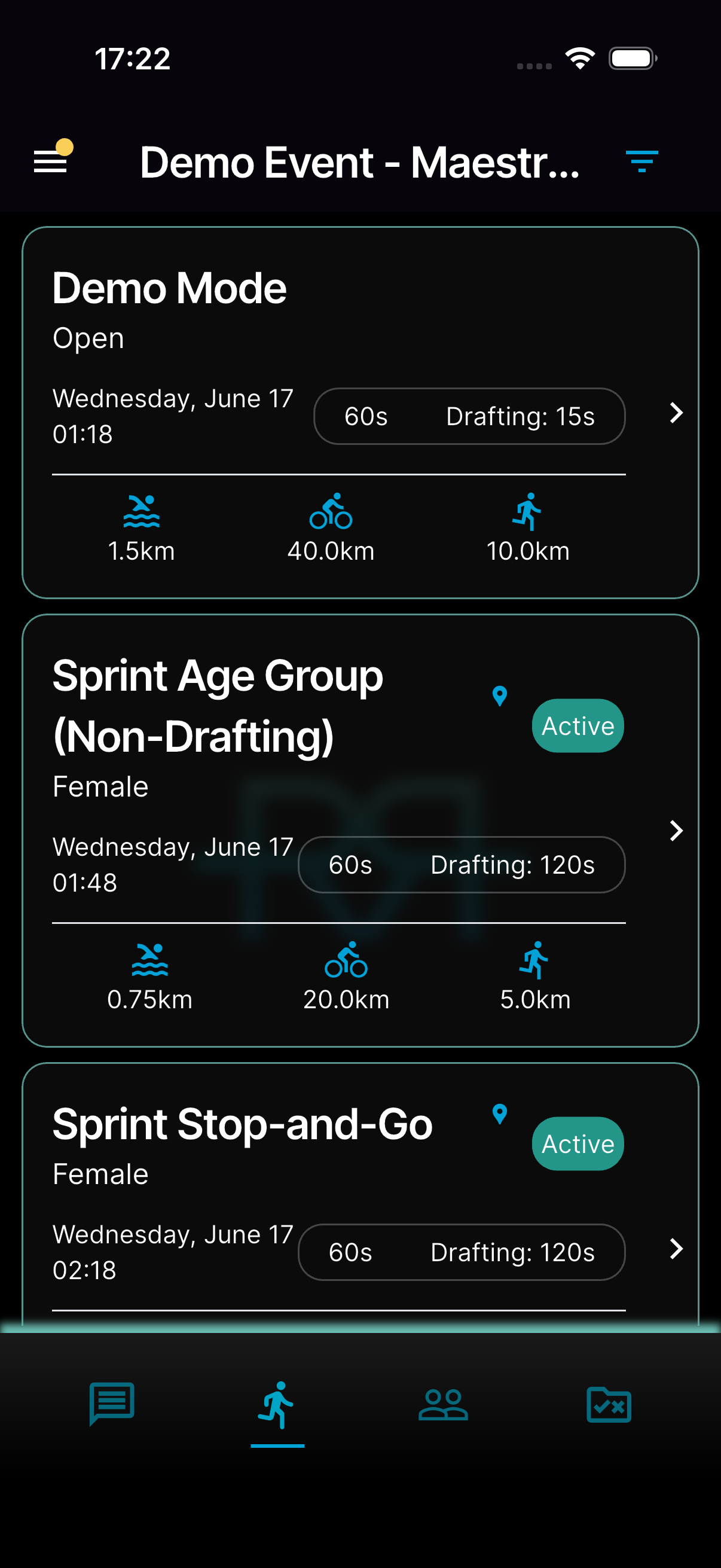
Inside an event, the bar at the bottom of the screen switches between:
- Chat — the event's chat channels.
- Races — the races in the event, each with its status: Pending, Active, Running (active, with penalties or incidents already logged), or Finished. Tap an active race to enter race mode. The Demo Mode race is there for practice.
- Penalties & incidents — every penalty and incident across the event, with a filter by race. Tap + at the top to add an incident, including one that isn't about a specific race. You see this tab if your role can see penalties or incidents.
- Users — the officials in the event.
- Documents — event and organisation documents.
Some events also have an Info tab with the event details, current weather, and forecast. Notifications are in the menu at the top left.
Switching between events
If you're in more than one event, open the menu at the top left and tap Change Event to go back to Active Events and pick another one.