AI assistant
The AI assistant configures an event for you from plain-language requests. Instead of clicking through each race and user, you describe what you want — or paste a roster, or attach a start list — and the assistant turns it into a set of changes you review and apply.
Try it
- Open the assistant:
- Web — open the event, click the menu button (☰) at the bottom right of the event page and choose AI assistant.
- App — open the event, open its Chat tab, and tap the pinned AI assistant at the top of the chat list. It reopens your last conversation.
- Describe what you want in plain language, or paste a list, or attach a file (image, PDF, CSV, Excel or text — up to 5 MB). When you attach a PDF, tick Also save to event documents to keep it with the event.
- The assistant replies with a proposal: a checklist of the exact changes it will make, each showing the old value and the new value.
- Review it. Untick anything you don't want, then tap Apply selected. You can also Discard the whole proposal.
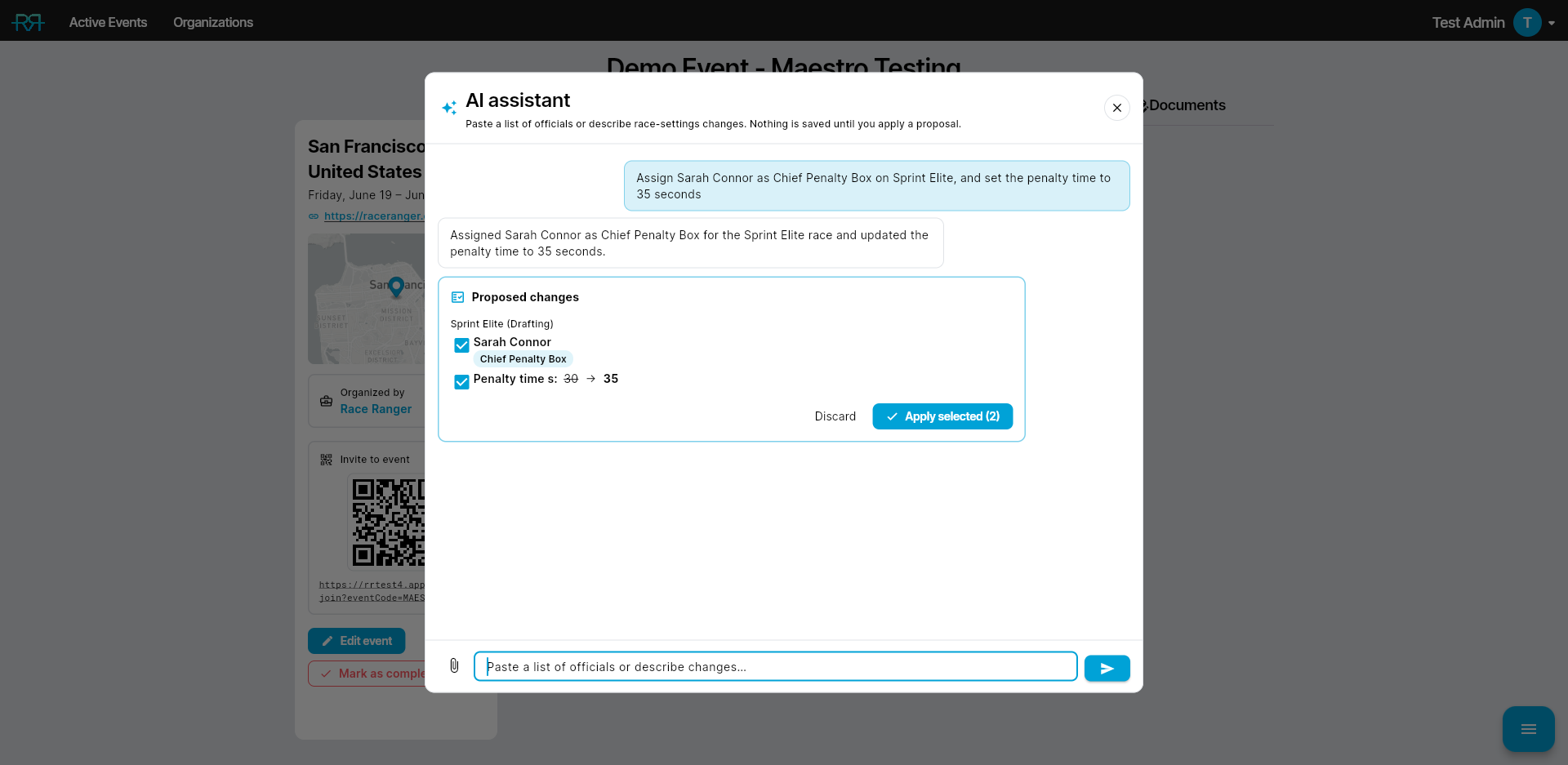
Nothing is saved until you apply. Every change is applied with your own account and permissions, so the assistant can never do anything you couldn't do yourself. Answers are AI-generated and can be wrong, so check them before you act on them. The copy button under each message copies its text.
A few prompts to start with:
- Paste a roster like
Anna Schmidt; Chief Race Official; Sprint Men - "Make all races non-drafting with a 30-second penalty"
- "Add bib numbers 300–400 to Sprint Elite"
If you don't see it
The AI assistant is enabled per organisation by the RaceRanger team, like an API integration. Once it's on, it's available on every event to organisation admins and to anyone with permission to modify the event. If you don't see it, either it isn't enabled for your organisation or you don't have event-edit permission — contact RaceRanger to turn it on.
If the app says it's too old for the assistant, update the app or use the web version.
Full details
Everything below is optional reading — open a section when you need it.
Everything it can do (full list)
- Assign Technical Official roles to officials, per race.
- Set a person's event-wide role.
- Approve someone who asked to join and set their role in the same step — if you don't name a role, it asks which one, or reuses the role they chose when they requested to join.
- Change race settings (penalty time, drafting time, penalty box vs. stop-and-go, serve times for single penalty types, walk-in serves, the reporter's correction window, and more).
- Set a race's athlete check-in checklist (Elite / U23 / Junior, Para PTS, Para PTVI, Para PTWC, No athlete check-in, or from the race name), when check-in is on for the event — see Using the AI assistant for check-in.
- Change event settings (name, dates, city, country, event URL).
- Add bib-number ranges to a race, or replace a race's ranges to change or drop numbers.
- Add people who aren't on the event yet: give their full email address and a role. People with a RaceRanger account are added straight away; anyone else gets an email invitation.
- Create a custom chat with at least three people, or change who's in one.
- Fill in TO roles for a whole list at once — for example, give everyone who has no role on certain races the same role.
- Create new races.
- Merge several races into one combined race, or split a combined race back into its parts. You can also ask it to rename a combined race — it renames the races inside so the combined race shows the exact name you asked for, keeping any Men/Women split if you want one.
- Delete a race you no longer need. Merging, splitting and deleting races need organisation admin rights.
- Answer questions from documents you've uploaded to the event or organisation, such as an athletes' guide or rule book.
- With event data analysis enabled (see the next section), answer questions about the live event — penalties, incidents, athletes, weather, the race activity log, and the races themselves, including each race's status (pending, active, running, or finished).
- Adjust a single member's permissions for this event, as a last resort — it will propose assigning a fitting role first, and any override applies only to that person in that event.
- Act on your own account when you refer to yourself — "approve me," "assign me as head referee," "change my role." Changing your own event-wide role or approving your own membership still needs an organisation admin, the same as doing it by hand.
More example prompts:
- "Add Marco as head referee on every race"
- "Change the event city to Brno and the country to Czech Republic"
- "Renumber the Sprint races so their bibs don't clash, then merge them"
- Attach a start list and ask it to assign officials
You don't have to get names exactly right. The assistant matches across case, accents, and first/last-name order, tolerates small typos, and maps role labels by meaning — including labels in other languages. If it can't confidently match a name, it lists it as unmatched rather than guessing, and it may ask you a single clarifying question before proposing. Pasted and attached content is read as data — names, roles, settings — never as instructions. You can also ask about documents already uploaded to the event or organisation — the assistant reads them directly, so you don't need to re-attach them.
Asking about live event data
Event data analysis is a separate, additional switch on your organisation, also enabled by the RaceRanger team on request. It lets the assistant retrieve and analyze live event data to answer questions, which uses more AI capacity than configuration alone — that's why it's a separate option. Without it, the assistant sticks to configuration and document questions.
With it enabled, the assistant answers read-only questions from the event's own data, for example:
- "How many penalties does athlete 42 have, and were they accepted by the penalty box?"
- "Which penalties are still waiting for the penalty box?"
- "What happened in the last 30 minutes?" (from the race activity log)
- "What's the water temperature trend today?" — weather history including water temperature, plus the daily forecast.
- "How many athletes are out of the race?"
- "How is athlete check-in going in each race?" — per-race check-in progress, when check-in is on for the event.
- "Find the wetsuit rule in the athletes' guide" — searches the documents uploaded to the event or organisation.
Athletes come with their country code, and on relay events penalties and incidents are counted per team leg — for example "#12 (B)".
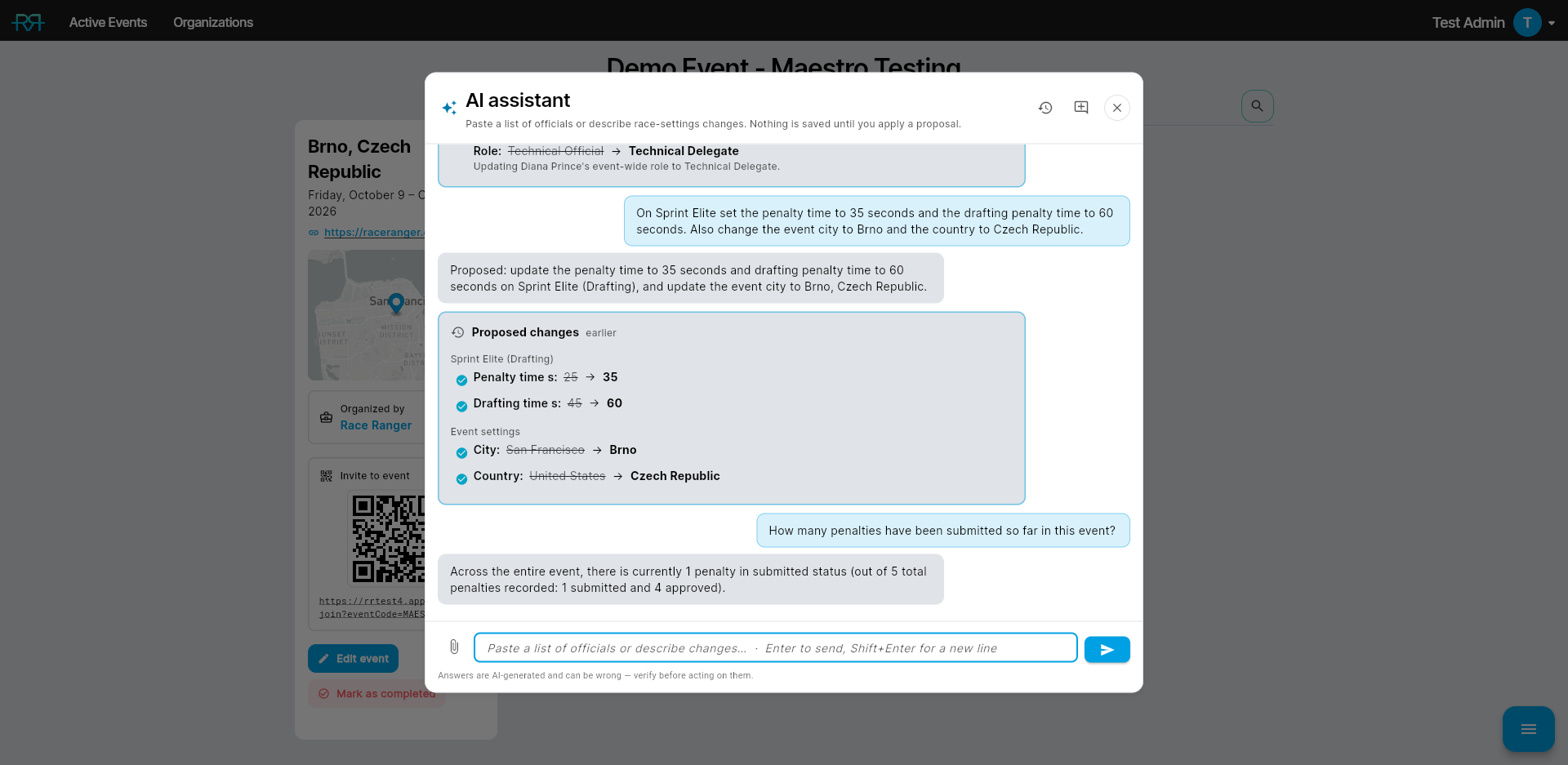
Answers come from the live data at the moment you ask — asking again after something changes gives the updated picture. The assistant only reads; it never changes penalties, incidents, or any other event data, and event chats are never included. General knowledge questions unrelated to the event are still declined.
What it won't do, and why
The assistant validates every change against the event's own rules and quietly drops anything that isn't allowed, telling you why:
- It won't change settings that are locked because a race has already started.
- It won't create demo races.
- It won't add bib-number ranges that overlap existing numbers. Once a race has started, its existing numbers can't change; you can still add ranges.
- It won't delete a race that has already started, or one that already has recorded penalties or incidents. To remove a combined race, split it first, then delete the parts.
- It only works with this event — configuring it, and (with event data analysis on) answering questions about its data. It declines anything off-topic — general knowledge, other events, writing, translation, and so on.
A few areas stay out of scope and are still done by hand: changing the event size tier (it affects billing), the sport, the timezone and the map location.
Limits and conversations
There's a per-minute and per-day cap on requests to keep usage reasonable; if you hit it, wait a moment and try again. Each person has their own conversations with the assistant. When you reopen it, the assistant picks up the conversation you were last in; use New chat to start a fresh one whenever you want a clean slate, or Previous chats to browse and reopen an earlier conversation for this event. Within a conversation, the assistant remembers the changes you've already applied, so it won't propose the same change twice. Long conversations keep working — the assistant summarises the earlier messages on its own, and suggests starting a fresh chat once one gets very long.